A while back, ChatGPT started doing something I didn’t want—I think it started suggesting prompts or topics I might like to try. I went straight to the settings to see if I could turn it off.
Faced with a screen full of checkboxes and toggles, I remember thinking: This is stupid. Why can’t I just tell ChatGPT what I want?
That experience stuck with me when I built Personal Preferences for users.
Your preferences, and your preferences only
By letting you describe what you want in your own words instead of filling in an event form, Schedule Us makes it ridiculously easy to put something in your calendar. So the last thing Schedule Us should do is give you a Preferences page that’s a tedious form!
But I also didn’t want a Preferences page that includes only what I anticipated in advance. If settings depended on me to build them, every user would see settings they don’t care about and would miss a setting they need.
With the Customize button, you just describe what you want, and Schedule Us builds the setting for you.
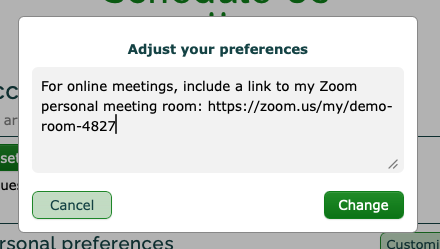
Schedule Us turns your instructions into a setting you can turn on or off and edit whenever you like.

AI, but under the hood
This is the bigger idea behind Schedule Us. I don’t want to take a traditional app and bolt an AI chatbot onto it. I want to give you an app that’s better because AI is at work behind the scenes.
Once your new setting is built, you use a checkbox to toggle it or click the edit pencil to adjust it—exactly as if it came built in. You can almost miss that AI was even involved.
That doesn’t mean you can only use the checkbox and UI controls. If you prefer, you can simply describe the changes you’d like:
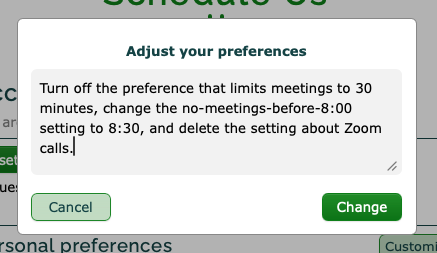
Schedule Us will take care of adjusting your Preferences for you (the way I wish ChatGPT did).
Not sure what custom setting you want to add? Try asking Schedule Us to suggest a useful one—you may be pleasantly surprised.
The goal is not more AI to deal with, but less work for you.
Spread the word
Schedule Us is growing. Keep using it, keep sending feedback, and please share it with anyone you think could benefit.
Of course, if there is an improvement you’d like to see that Custom Preferences can’t handle, let me know. My greatest pleasure in developing Schedule Us comes from building things that actual users ask for.